找到 7 篇与 Tool 相关的结果
-
 Osintgram 使用教程与功能详解 推荐一个实用的开源工具——**Osintgram**。项目由Datalux开发维护,GitHub上获得了 **14305** 个Star。简单来说,它是一款Osintgram是Instagram上的OSINT工具。它提供了一个交互式外壳,可以通过其昵称对任何用户的Instagram帐户进行分析,对于站长和开发者来说是个不错的工具。 # # 工具功能介绍 Osintgram is an **OSINT** tool on Instagram to collect, analyze, and run reconnaissance. Disclaimer: **FOR EDUCATIONAL PURPOSE ONLY! The contributors do not assume any responsibility for the use of this tool.**$${\color{red /}Warning:}$$ It is advisable to **not** use your own/primary account when using this tool.$${\color{red /}Warning:}$$ If you fork the project and add your instagram credentials to you home repository do not upload them to github. You can disable uploading a certain file by adding it to ignore list.## Tools and Commands ?Osintgram offers an interactive shell to perform analysis on Instagram account of any users by its nickname. You can get: text - addrs Get all registered addressed by target photos - captions Get user's photos captions - comments Get total comments of target's posts - followers Get target followers - followings Get users followed by target - fwersemail Get email of target followers - fwingsemail Get email of users followed by target - fwersnumber Get phone number of target followers - fwingsnumber Get phone number of users followed by target - hashtags Get hashtags used by target - info Get target info - likes Get total likes of target's posts - mediatype Get user's posts type (photo or video) - photodes Get description of target's photos - photos Download user's photos in output folder - proDownload user's profile ture - stories Download user's stories - tagged Get list of users tagged by target - wcommented Get a list of user who commented target's photos - wtagged Get a list of user who tagged target You can find detailed commands usage [here](doc/COMMANDS.md).[**Latest version**](https://github.com/Datalux/Osintgram/releases/tag/1.3) | [Commands](doc/COMMANDS.md) | [CHANGELOG](doc/CHANGELOG.md)## FAQ 1. **Can I access the contents of a private profile?** No, you cannot get information on private profiles. You can only get information from a public profile or a profile you follow. The tools that claim to be successful are scams! 2. **What is and how I can bypass the `challenge_required` error?** The `challenge_required` error means that Instagram notice a susious behavior on your profile, so needs to check if you are a real person or a bot. To avoid this you should follow the suggested link and complete the required operation (insert a code, confirm email, etc)## Installation ⚙️1. Fork/Clone/Download this repo`git clone https://github.com/Datalux/Osintgram.git`2. Navigate to the directory`cd Osintgram`3. Create a virtual environment for this project`python3 -m venv venv`4. Load the virtual environment - On Windows Powershell: `.\venv\Scripts\activate.ps1` - On Linux and Git Bash: `source venv/bin/activate` 5. Run `pip install -r requirements.txt`6. Open the `credentials.ini` file in the `config` folder and write your Instagram account username and password in the corresponding fields. Or use `hikerapi_token` from https://hikerapi.com/tokens (first 100 requests are free after registration and confirmation of your tg)Alternatively, you can run the `make setup` command to populate this file for you.7. Run the main.py script in one of three ways* As an interactive prompt `python3 main.py ` * Or execute your command straight away `python3 main.py --command ` * Or execute using HikerAPI token via env `HIKERAPI_TOKEN= python3 main.py -c ` ### Use Osintgram v2 (beta) You can use Osintgram2 beta just switching to `v2` [branch](https://github.com/Datalux/Osintgram/tree/v2). The v2 has some improvements and is faster with a new command execution interface. Try it just running `git checkout v2`.## Docker Quick Start ?This section will explain how you can quickly use this with `Docker` or `Docker-compose`. ### Prerequisites Before you can use either `Docker` or `Docker-compose`, please ensure you do have the following prerequisites met.1. **Docker** installed - [link](https://docs.docker.com/get-docker/) 2. **Docker-composed** installed (if using Docker-compose) - [link](https://docs.docker.com/compose/install/) 3. **Credentials** configured - This can be done manually or by running the `make setup` command from the root of this repo**Important**: Your container will fail if you do not do step #3 and configure your credentials### Docker If docker is installed you can build an and run this as a container.Build: bash docker build -t osintgram . Run: bash docker run --rm -it -v "$PWD/output:/home/osintgram/output" osintgram - The `` is the Instagram account you wish to use as your target for recon. - The required `-i` flag enables an interactive terminal to use commands within the container. [docs](https://docs.docker.com/engine/reference/commandline/run/#assign-name-and-allocate-pseudo-tty---name--it) - The required `-v` flag mounts a volume between your local filesystem and the container to save to the `./output/` folder. [docs](https://docs.docker.com/engine/reference/commandline/run/#mount-volume--v---read-only) - The optional `--rm` flag removes the container filesystem on completion to prevent cruft build-up. [docs](https://docs.docker.com/engine/reference/run/#clean-up---rm) - The optional `-t` flag allocates a pseudo-TTY which allows colored output. [docs](https://docs.docker.com/engine/reference/run/#foreground)### Using `docker-compose`You can use the `docker-compose.yml` file this single command: bash docker-compose run osintgram Where `target` is the Instagram target for recon.Alternatively, you may run `docker-compose` with the `Makefile`:`make run` - Builds and Runs with compose. Prompts for a `target` before running. ### Makefile (easy mode)For ease of use with Docker-compose, a `Makefile` has been provided.Here is a sample work flow to spin up a container and run `osintgram` with just two commands!1. `make setup` - Sets up your Instagram credentials 2. `make run` - Builds and Runs a osintgram container and prompts for a targetSample workflow for development:1. `make setup` - Sets up your Instagram credentials 2. `make build-run-testing` - Builds an Runs a container without invoking the `main.py` script. Useful for an `it` Docker session for development 3. `make cleanup-testing` - Cleans up the testing container created from `build-run-testing`## Development version ?To use the development version with the latest feature and fixes just switch to `development` branch using Git:`git checkout development`and update to last version using:`git pull origin development` ## Updating ⬇️To update Osintgram with the stable release just pull the latest commit using Git.1. Make sure you are in the master branch running: `git checkout master` 2. Download the latest version: `git pull origin master` ## Contributing ?You can propose a feature request opening an issue or a pull request.Here is a list of Osintgram's contributors: # # External library ?[Instagram API](https://github.com/ping/instagram_private_api) {card-default label="? 工具信息" /} ? 项目地址:[https://github.com/Datalux/Osintgram](https://github.com/Datalux/Osintgram) ⭐ Star数:14305 ? 开发语言:Python ? 项目描述:Osintgram是Instagram上的OSINT工具。它提供了一个交互式外壳,可以通过其昵称对任何用户的Instagram帐户进行分析 {/card-default}{cloud type="default" title="网盘下载" url="https://github.com/Datalux/Osintgram/archive/refs/heads/master.zip"} {cloud type="default" title="网盘下载" url="https://github.com/Datalux/Osintgram"}总的来说,**Osintgram**是一个功能比较实用的开源工具,适合日常工作和学习使用。如果你正在寻找一款相关工具,不妨下载试试。使用前建议仔细阅读项目文档。
-
GhostTrack - 一款值得收藏的神器 推荐一个实用的开源工具——**GhostTrack**。项目由HunxByts开发维护,GitHub上获得了 **15019** 个Star。简单来说,它是一款跟踪位置或,对于站长和开发者来说是个不错的工具。 # # 工具功能介绍 Useful tool to track location or mobile number, so this tool can be called osint or also information gatheringNew update : Version 2.2 ### Instalation on Linux (deb) sudo apt-get install git sudo apt-get install python3 ### Instalation on Termux pkg install git pkg install python3 ### Usage Tool git clone https://github.com/HunxByts/GhostTrack.git cd GhostTrack pip3 install -r requirements.txt python3 GhostTR.py Display on the menu IP Tracker on the IP Track menu, you can combo with the seeker tool to get the target IP :zap: Install Seeker : - Get Seeker Display on the menu Phone Tracker on this menu you can search for information from the target phone numberDisplay on the menu Username Tracker on this menu you can search for information from the target username on social media :zap: Author : - HunxByts{card-default label="? 工具信息" /} ? 项目地址:[https://github.com/HunxByts/GhostTrack](https://github.com/HunxByts/GhostTrack) ⭐ Star数:15019 ? 开发语言:Python ? 项目描述:跟踪位置或 {/card-default}{cloud type="default" title="网盘下载" url="https://github.com/HunxByts/GhostTrack/archive/refs/heads/main.zip"} {cloud type="default" title="网盘下载" url="https://github.com/HunxByts/GhostTrack"}总的来说,**GhostTrack**是一个功能比较实用的开源工具,适合日常工作和学习使用。如果你正在寻找一款相关工具,不妨下载试试。使用前建议仔细阅读项目文档。
-
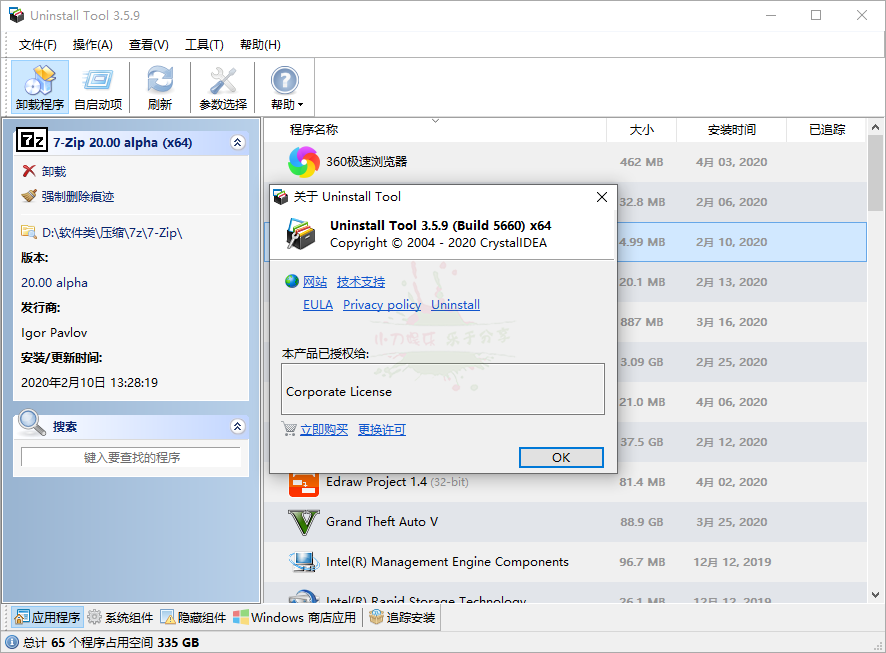
Uninstall Tool v3.8.2.5765便携版 软件介绍 Uninstall Tool是一款小巧强大的专业卸载工具。它比Windows自带的”添加/删除程序”功能快3倍! 它可移除系统自带程序功能所不能删除的程序,使用强制删除可卸载注册表相关项,支持显示隐藏的安装程序,按名称过滤已安装程序列表,强行卸载程序,浏览注册表项目,保存安装程序列表,软件小巧,操作简便。 软件Uninstall Tool v3.8.2.5765便携版 图片2 Uninstall Tool v3.8.2.5765便携版 图片4 更新日志 crystalidea.com/uninstall-tool/release-notes Uninstall·Tool v3.8.2(2026·08·19)更新内容: · 新增卸载日志:卸载结束可直接导出详细卸载记录 · 优化激活弹窗:激活无需重启,校验许可证密钥格式 · 优化强制卸载:删除文件前解除任务栏固定快捷方式 · 优化便携版:程序内激活,密钥随程序,无需手动编辑license.dat · 更新语言翻译:法语、韩语、简体/繁体中文等多国语言 · 修复Edge及配套应用:普通卸载无效,仅提供强制卸载 · 修复多显示器下启动项页面软件卡死问题 · 其他细节优化与小bug修复 版本特点 by Sinan 基于官方绿色便携版,逆向修改,免激活,无需密钥。 补全简体中文语言新增的未翻译字串,删除多国语言; 去后续检测更新提示,去菜单检测更新项、去设置检测更新/添加控制面板项; 绿色单文件支持安装跟踪器功能,退出自动删除安装跟踪器相关文件残留信息; ⬇️ 下载地址 下载后请先检查文件完整性,如有问题请在评论区反馈
-
专业卸载工具Uninstall Tool v3.8.2.5761便携版 软件介绍 Uninstall Tool是一款小巧强大的专业卸载工具。它比Windows自带的”添加/删除程序”功能快3倍! 它可移除系统自带程序功能所不能删除的程序,使用强制删除可卸载注册表相关项,支持显示隐藏的安装程序,按名称过滤已安装程序列表,强行卸载程序,浏览注册表项目,保存安装程序列表,软件小巧,操作简便。 更新日志 crystalidea.com/uninstall-tool/release-notes Uninstall?Tool v3.8.2(2026?08?19)更新内容: ? 新增卸载日志:卸载结束可直接导出详细卸载记录 ? 优化激活弹窗:激活无需重启,校验许可证密钥格式 ? 优化强制卸载:删除文件前解除任务栏固定快捷方式 ? 优化便携版:程序内激活,密钥随程序,无需手动编辑license.dat ? 更新语言翻译:法语、韩语、简体/繁体中文等多国语言 ? 修复Edge及配套应用:普通卸载无效,仅提供强制卸载 ? 修复多显示器下启动项页面软件卡死问题 ? 其他细节优化与小bug修复 版本特点 by Sinan 基于官方绿色便携版,逆向修改,免激活,无需密钥。 补全简体中文语言新增的未翻译字串,删除多国语言; 去后续检测更新提示,去菜单检测更新项、去设置检测更新/添加控制面板项; 绿色单文件支持安装跟踪器功能,退出自动删除安装跟踪器相关文件残留信息; ⬇️ 下载地址 下载后请先检查文件完整性,如有问题请在评论区反馈
-
Uninstall Tool v3.8.2.5761便携版 软件介绍 Uninstall Tool是一款小巧强大的专业卸载工具。它比Windows自带的”添加/删除程序”功能快3倍! 它可移除系统自带程序功能所不能删除的程序,使用强制删除可卸载注册表相关项,支持显示隐藏的安装程序,按名称过滤已安装程序列表,强行卸载程序,浏览注册表项目,保存安装程序列表,软件小巧,操作简便。 软件Uninstall Tool v3.8.2.5761便携版 图片2 Uninstall Tool v3.8.2.5761便携版 图片4 更新日志 crystalidea.com/uninstall-tool/release-notes Uninstall?Tool v3.8.2(2026?08?19)更新内容: ? 新增卸载日志:卸载结束可直接导出详细卸载记录 ? 优化激活弹窗:激活无需重启,校验许可证密钥格式 ? 优化强制卸载:删除文件前解除任务栏固定快捷方式 ? 优化便携版:程序内激活,密钥随程序,无需手动编辑license.dat ? 更新语言翻译:法语、韩语、简体/繁体中文等多国语言 ? 修复Edge及配套应用:普通卸载无效,仅提供强制卸载 ? 修复多显示器下启动项页面软件卡死问题 ? 其他细节优化与小bug修复 版本特点 by Sinan 基于官方绿色便携版,逆向修改,免激活,无需密钥。 补全简体中文语言新增的未翻译字串,删除多国语言; 去后续检测更新提示,去菜单检测更新项、去设置检测更新/添加控制面板项; 绿色单文件支持安装跟踪器功能,退出自动删除安装跟踪器相关文件残留信息; ⬇️ 下载地址 下载后请先检查文件完整性,如有问题请在评论区反馈
-
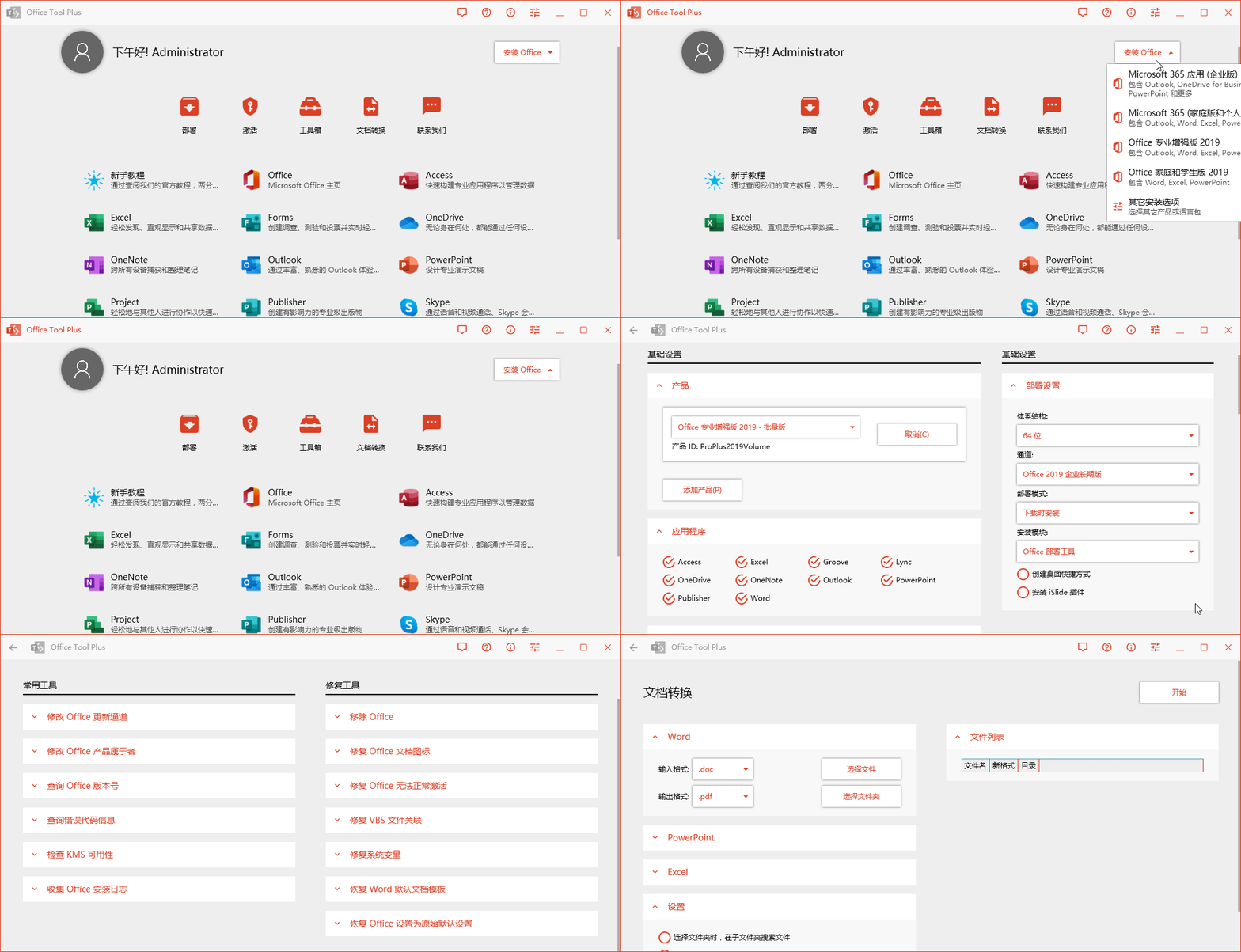
Office Tool Plus v11.0.27.0绿色版 软件介绍 Office Tool Plus(简称OTP)是一款微软Office办公软件下载、安装、管理的辅助增强工具。它可以快速自定义部署,在线下载安装 Office 的各个版本,也可以通过已有的离线安装文件来部署Office镜像,同时在安装过程中你可以自由选择安装哪些需要使用的组件, 在安装之后也可以单独来安装某个需要的组件。 软件Office Tool Plus v11.0.27.0绿色版 图片2 更新日志 github.com/YerongAI/Office-Tool/releases 支持下列产品 Microsoft 365 Office 2021、2019、2016 Visio Online Plan 2 & 2021、2019、2016 Project Online Desktop Client & 2021、2019、2016 功能介绍 部署 Office(包含下载、安装、激活、管理) 查询通道版本,自定义安装Office产品,语言包 设置优化、修复/重置、导出/导入XML配置文件 添加产品、应用程序、语言包至现有的Office中 卸载Office一个或多个产品、应用程序、语言包 支持在线激活、电话激活、KMS激活 安装、卸载 Office 许可证(转换 Office 版本) 管理 Office 的 KMS 激活,一键清理许可证密钥 更改 Office 的更新通道而无需重新安装 Office 支持批量转换文档:转换Office文档为其它格式 工具箱内置多种小工具助您解决问题 运行要求 .NET 5.0 Desktop Runtime x86 Windows 10, Windows Server 2019 ⬇️ 下载地址 {cloud type="tianyi" title="天翼云盘" url="https://cloud.189.cn/t/Nb2Q3mNB73Yv(访问码:s8k6)"} 下载后请先检查文件完整性,如有问题请在评论区反馈