找到 707 篇与 教程 相关的结果 - 第 5 页
-
 202305软考中级软件设计师课程 202305软考中级软件设计师课程 图片1 课程介绍 《202305软考中级软件设计师课程》是专为准备参加软考中级软件设计师考试的学员设计的培训课程。课程内容涵盖软件设计原理、需求分析、系统设计、数据库设计等方面知识,通过理论讲解和实践案例演练,帮助学员全面掌握软件设计领域的专业知识和技能,提高考试的应试能力。 学习地址 百度:https://pan.baidu.com/s/1APASAjfjY7tv-vlVYw5efA?pwd=ko3h 天翼:https://cloud.189.cn/t/UVjEvyNrUfI3(访问码:1exg) 阿里:https://www.aliyundrive.com/s/P23F5FbB1i5 夸克:https://pan.quark.cn/s/431f05b480ee 下载后请先检查文件完整性,如有问题请在评论区反馈
-
走进你人生的第一节AI设计课程 走进你人生的第一节AI设计课程 图片1 课程介绍 这是一门引人入胜的学习体验,旨在揭示人工智能设计领域的奥秘。通过深入理解 AI 技术和设计原则,学员将学习如何创建令人惊叹的交互体验,并掌握构建智能系统的要领。这门课程将为你开启创新思维,打造未来的设计之路。 学习地址 百度:https://pan.baidu.com/s/17U6dN3dur-_kEHvBhK4SQg?pwd=yh9j 天翼:https://cloud.189.cn/t/zeQvauNziimy(访问码:hwq3) 阿里:https://www.aliyundrive.com/s/6eGshPYDcYV 夸克:https://pan.quark.cn/s/4aefecca534e 下载后请先检查文件完整性,如有问题请在评论区反馈
-
Python零基础数据库可视化教程 Python零基础数据库可视化教程 图片1 课程介绍 Python是目前最受欢迎的编程语言,MySQL是全球非常流行的关系型数据库产品,Linux是使用得最为广泛的服务器操作系统,Git是企业广泛应用的分布式版本控制系统,Flask是Python实现API接口开发的轻量级框架,ECharts是非常强大的前端统计图表库。本次课程涵盖了使用Python+MySQL实现数据持久化和可视化的内容,覆盖了版本控制系统的应用,覆盖了Linux服务器的使用,覆盖了前后端分离开发技术,是一套极具实用价值的Python数据可视化教程。 学习地址 百度:https://pan.baidu.com/s/1Jc7iKy5HCMYXxKelWBXmqQ 天翼:https://cloud.189.cn/t/IJJRnuNJbeA3 阿里:https://www.aliyundrive.com/s/WeVkvWj1kMf 下载后请先检查文件完整性,如有问题请在评论区反馈
-
小白的短视频美感剪辑课程 小白的短视频美感剪辑课程 图片4 课程介绍 小白的短美感剪辑课程是一个专为初学者设计的课程。通过学习本课程,你将了解短剪辑的基础知识和技巧,包括画面剪辑、音乐选择、字幕添加等。我们将引导你掌握如何用简洁而有趣的方式讲述故事,提升你的制作技能和美感水平。作感兴趣的小白加入! 学习地址 百度:https://pan.baidu.com/s/1_EDO3FRjiFNLPUnrctC5aA?pwd=0xj5 天翼:https://cloud.189.cn/t/36vABbumeQfe(访问码:1wh7) 阿里:https://www.aliyundrive.com/s/1qxLvn6egZw 夸克:https://pan.quark.cn/s/0d870387fcff 下载后请先检查文件完整性,如有问题请在评论区反馈
-
Osintgram 使用教程与功能详解 推荐一个实用的开源工具——**Osintgram**。项目由Datalux开发维护,GitHub上获得了 **14305** 个Star。简单来说,它是一款Osintgram是Instagram上的OSINT工具。它提供了一个交互式外壳,可以通过其昵称对任何用户的Instagram帐户进行分析,对于站长和开发者来说是个不错的工具。 # # 工具功能介绍 Osintgram is an **OSINT** tool on Instagram to collect, analyze, and run reconnaissance. Disclaimer: **FOR EDUCATIONAL PURPOSE ONLY! The contributors do not assume any responsibility for the use of this tool.**$${\color{red /}Warning:}$$ It is advisable to **not** use your own/primary account when using this tool.$${\color{red /}Warning:}$$ If you fork the project and add your instagram credentials to you home repository do not upload them to github. You can disable uploading a certain file by adding it to ignore list.## Tools and Commands ?Osintgram offers an interactive shell to perform analysis on Instagram account of any users by its nickname. You can get: text - addrs Get all registered addressed by target photos - captions Get user's photos captions - comments Get total comments of target's posts - followers Get target followers - followings Get users followed by target - fwersemail Get email of target followers - fwingsemail Get email of users followed by target - fwersnumber Get phone number of target followers - fwingsnumber Get phone number of users followed by target - hashtags Get hashtags used by target - info Get target info - likes Get total likes of target's posts - mediatype Get user's posts type (photo or video) - photodes Get description of target's photos - photos Download user's photos in output folder - proDownload user's profile ture - stories Download user's stories - tagged Get list of users tagged by target - wcommented Get a list of user who commented target's photos - wtagged Get a list of user who tagged target You can find detailed commands usage [here](doc/COMMANDS.md).[**Latest version**](https://github.com/Datalux/Osintgram/releases/tag/1.3) | [Commands](doc/COMMANDS.md) | [CHANGELOG](doc/CHANGELOG.md)## FAQ 1. **Can I access the contents of a private profile?** No, you cannot get information on private profiles. You can only get information from a public profile or a profile you follow. The tools that claim to be successful are scams! 2. **What is and how I can bypass the `challenge_required` error?** The `challenge_required` error means that Instagram notice a susious behavior on your profile, so needs to check if you are a real person or a bot. To avoid this you should follow the suggested link and complete the required operation (insert a code, confirm email, etc)## Installation ⚙️1. Fork/Clone/Download this repo`git clone https://github.com/Datalux/Osintgram.git`2. Navigate to the directory`cd Osintgram`3. Create a virtual environment for this project`python3 -m venv venv`4. Load the virtual environment - On Windows Powershell: `.\venv\Scripts\activate.ps1` - On Linux and Git Bash: `source venv/bin/activate` 5. Run `pip install -r requirements.txt`6. Open the `credentials.ini` file in the `config` folder and write your Instagram account username and password in the corresponding fields. Or use `hikerapi_token` from https://hikerapi.com/tokens (first 100 requests are free after registration and confirmation of your tg)Alternatively, you can run the `make setup` command to populate this file for you.7. Run the main.py script in one of three ways* As an interactive prompt `python3 main.py ` * Or execute your command straight away `python3 main.py --command ` * Or execute using HikerAPI token via env `HIKERAPI_TOKEN= python3 main.py -c ` ### Use Osintgram v2 (beta) You can use Osintgram2 beta just switching to `v2` [branch](https://github.com/Datalux/Osintgram/tree/v2). The v2 has some improvements and is faster with a new command execution interface. Try it just running `git checkout v2`.## Docker Quick Start ?This section will explain how you can quickly use this with `Docker` or `Docker-compose`. ### Prerequisites Before you can use either `Docker` or `Docker-compose`, please ensure you do have the following prerequisites met.1. **Docker** installed - [link](https://docs.docker.com/get-docker/) 2. **Docker-composed** installed (if using Docker-compose) - [link](https://docs.docker.com/compose/install/) 3. **Credentials** configured - This can be done manually or by running the `make setup` command from the root of this repo**Important**: Your container will fail if you do not do step #3 and configure your credentials### Docker If docker is installed you can build an and run this as a container.Build: bash docker build -t osintgram . Run: bash docker run --rm -it -v "$PWD/output:/home/osintgram/output" osintgram - The `` is the Instagram account you wish to use as your target for recon. - The required `-i` flag enables an interactive terminal to use commands within the container. [docs](https://docs.docker.com/engine/reference/commandline/run/#assign-name-and-allocate-pseudo-tty---name--it) - The required `-v` flag mounts a volume between your local filesystem and the container to save to the `./output/` folder. [docs](https://docs.docker.com/engine/reference/commandline/run/#mount-volume--v---read-only) - The optional `--rm` flag removes the container filesystem on completion to prevent cruft build-up. [docs](https://docs.docker.com/engine/reference/run/#clean-up---rm) - The optional `-t` flag allocates a pseudo-TTY which allows colored output. [docs](https://docs.docker.com/engine/reference/run/#foreground)### Using `docker-compose`You can use the `docker-compose.yml` file this single command: bash docker-compose run osintgram Where `target` is the Instagram target for recon.Alternatively, you may run `docker-compose` with the `Makefile`:`make run` - Builds and Runs with compose. Prompts for a `target` before running. ### Makefile (easy mode)For ease of use with Docker-compose, a `Makefile` has been provided.Here is a sample work flow to spin up a container and run `osintgram` with just two commands!1. `make setup` - Sets up your Instagram credentials 2. `make run` - Builds and Runs a osintgram container and prompts for a targetSample workflow for development:1. `make setup` - Sets up your Instagram credentials 2. `make build-run-testing` - Builds an Runs a container without invoking the `main.py` script. Useful for an `it` Docker session for development 3. `make cleanup-testing` - Cleans up the testing container created from `build-run-testing`## Development version ?To use the development version with the latest feature and fixes just switch to `development` branch using Git:`git checkout development`and update to last version using:`git pull origin development` ## Updating ⬇️To update Osintgram with the stable release just pull the latest commit using Git.1. Make sure you are in the master branch running: `git checkout master` 2. Download the latest version: `git pull origin master` ## Contributing ?You can propose a feature request opening an issue or a pull request.Here is a list of Osintgram's contributors: # # External library ?[Instagram API](https://github.com/ping/instagram_private_api) {card-default label="? 工具信息" /} ? 项目地址:[https://github.com/Datalux/Osintgram](https://github.com/Datalux/Osintgram) ⭐ Star数:14305 ? 开发语言:Python ? 项目描述:Osintgram是Instagram上的OSINT工具。它提供了一个交互式外壳,可以通过其昵称对任何用户的Instagram帐户进行分析 {/card-default}{cloud type="default" title="网盘下载" url="https://github.com/Datalux/Osintgram/archive/refs/heads/master.zip"} {cloud type="default" title="网盘下载" url="https://github.com/Datalux/Osintgram"}总的来说,**Osintgram**是一个功能比较实用的开源工具,适合日常工作和学习使用。如果你正在寻找一款相关工具,不妨下载试试。使用前建议仔细阅读项目文档。
-
beef 安装配置与使用指南 推荐一个实用的开源工具——**beef**。项目由beefproject开发维护,GitHub上获得了 **11003** 个Star。简单来说,它是一款Browser Exploitation Framework项目,对于站长和开发者来说是个不错的工具。 # # 工具功能介绍 ===============================================================================Copyright (c) 2006-2026 Wade Alcorn - wade@bindshell.net Browser Exploitation Framework (BeEF) - https://beefproject.com See the file 'doc/COPYING' for copying permission===============================================================================What is BeEF? -------------__BeEF__ is short for __The Browser Exploitation Framework__. It is a penetration testing tool that focuses on the web browser.Amid growing concerns about web-borne attacks against clients, including mobile clients, BeEF allows the professional penetration tester to assess the actual security posture of a target environment by using client-side attack vectors. Unlike other security frameworks, BeEF looks past the hardened network perimeter and client system, and examines exploitability within the context of the one open door: the web browser. BeEF will hook one or more web browsers and use them as beachheads for launching directed command modules and further attacks against the system from within the browser context.Get Involved ------------You can get in touch with the BeEF team. Just check out the following:__Please, send us pull requests!____Web:__ https://beefproject.com/__Bugs:__ https://github.com/beefproject/beef/issues__Security Bugs:__ security@beefproject.com__Twitter:__ [@beefproject](https://twitter.com/beefproject)__Discord:__ https://discord.gg/25wT2P8pwxRequirements ------------* Operating System: Mac OSX 10.5.0 or higher / modern Linux. Note: Windows is not supported. * [Ruby](https://www.ruby-lang.org): 3.0 or newer * [SQLite](http://sqlite.org): 3.x * [Node.js](https://nodejs.org): 10 or newer * The gems listed in the Gemfile: https://github.com/beefproject/beef/blob/master/Gemfile * Selenium is required on OSX: `brew install selenium-server-standalone` (See https://github.com/shvets/selenium)Quick Start -----------__The following is for the impatient.__The `install` script installs the required operating system packages and all the prerequisite Ruby gems:$ ./install For full installation details, please refer to [INSTALL.txt](https://github.com/beefproject/beef/blob/master/INSTALL.txt) or the [Installation](https://github.com/beefproject/beef/wiki/Installation) page on the wiki.Upon successful installation, be sure to read the [Configuration](https://github.com/beefproject/beef/wiki/Configuration) page on the wiki for important details on configuring and securing BeEF.Documentation ---* [User Guide](https://github.com/beefproject/beef/wiki#user-guide) * [Frequently Asked Questions](https://github.com/beefproject/beef/wiki/FAQ) * [JSdocs](https://beefproject.github.io/beef/index.html)Usage -----To get started, simply execute beef and follow the instructions:$ ./beef {card-default label="? 工具信息" /} ? 项目地址:[https://github.com/beefproject/beef](https://github.com/beefproject/beef) ⭐ Star数:11003 ? 开发语言:JavaScript ? 项目描述:Browser Exploitation Framework项目 {/card-default}{cloud type="default" title="网盘下载" url="https://github.com/beefproject/beef/archive/refs/heads/master.zip"} {cloud type="default" title="网盘下载" url="https://github.com/beefproject/beef"}总的来说,**beef**是一个功能比较实用的开源工具,适合日常工作和学习使用。如果你正在寻找一款相关工具,不妨下载试试。使用前建议仔细阅读项目文档。
-
强大心态自信训练营视频课程 强大心态自信训练营视频课程 图片1 课程介绍 在人生的旅途中,我相信大家都想要成为一个“强大”的人,向往自己能强大以后不会被受欺负。那么如何才能让自己变成一个强大的人呢?真正强大的人会有非常强大的心态,这样的人是无坚不摧的,“强大”的人不会被任何事情打倒,因为“强大”的人内心很坚韧,他们都很会承受生活的苦难。然而真正“强大”的人,都会拥有这三种心态。让我们一起来看看吧。 学习地址 百度:https://pan.baidu.com/s/12Y40j3fWp-jSBd_8j4r7vQ 天翼:https://cloud.189.cn/t/iIBjUnERny6v(访问码:t8hd) 阿里:https://www.aliyundrive.com/s/9x7LdcUT1H4 夸克:https://pan.quark.cn/s/2bd1b9312d85 下载后请先检查文件完整性,如有问题请在评论区反馈
-
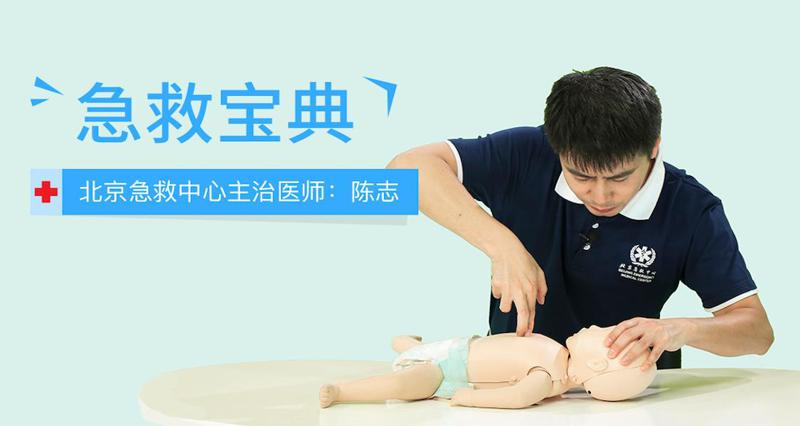
一秒打开就能照做的急救指南 一秒打开就能照做的急救指南 图片1 一秒打开就能照做的急救指南 图片3 教程介绍 全球唯一可以直接照着做的急救课程,学习最正确有效的急救知识,掌握最权威的急救方式,生死攸关时刻教你做出最正确的选择挽救生命。 学习地址 在线:https://cloud.189.cn/t/vEvMbij6Zniq(应急时看非压缩包) 百度:https://pan.baidu.com/s/1tlxJyv_Nthvl47hUnpDztg 天翼:https://cloud.189.cn/t/3iEfQjbIb6fi 微云:https://share.weiyun.com/tlr0BPdy UC:https://www.yun.cn/s/6a4be1799a54432593104dd74f2e2a75 文件信息 MD5: E4C1550D78655B83E68D9A5F8EC3781C SHA1: 0EE82FACFFB75C08ECA8C18212296F9C77A1439D CRC32: 9ED8D2DF 下载后请先检查文件完整性,如有问题请在评论区反馈
-
基础入门与初步应用课程实战课程 基础入门与初步应用课程实战课程 图片1 课程介绍 这个基础入门与初步应用课程实战课程将帮助学员掌握相关领域的基础知识,并通过实践应用探索更深入的技能。课程注重实际操作和案例分析,帮助学员将理论知识转化为实践能力,为未来的职业发展打下坚实基础。 学习地址 百度:https://pan.baidu.com/s/1JxSzpFBZO_9WB3kf_OWsEQ?pwd=ofbz 天翼:https://cloud.189.cn/t/yiqQnmvURjEr(访问码:ir1s) 阿里:https://www.aliyundrive.com/s/65RVjQ17Q8X 夸克:https://pan.quark.cn/s/ebf539b8e8e9 下载后请先检查文件完整性,如有问题请在评论区反馈
-
AIGC高级实战班一起学AI绘画 AIGC高级实战班一起学AI绘画 图片1 课程介绍 AIGC 高级实战班邀你深入探索!聚焦 Midjourney、Stable Diffusion 等工具高阶用法,拆解光影处理、风格迁移、复杂场景构建技巧。通过商业案例实训,掌握精准提示词逻辑与模型微调方法,从模仿到原创,让你画出兼具艺术感与商业价值的作品,成为 AI 绘画高手。 学习地址 百度:https://pan.baidu.com/s/14l03fK35I_Vm76nz6ECHBA?pwd=0yb2 天翼:https://cloud.189.cn/t/ZRJvIrYjyqEj(访问码:9vrk) 阿里:https://www.alipan.com/s/8W6LxhyKnvu 夸克:https://pan.quark.cn/s/2cb13fe45300 下载后请先检查文件完整性,如有问题请在评论区反馈
-
抖音小店抖店电商全攻略实操 抖音小店抖店电商全攻略实操 图片1 课程介绍 《抖音小店抖店电商全攻略实操》课程提供全面的抖音电商运营策略与实操技巧。学员将学习如何开设和优化抖音小店、设置商品、营销推广与数据分析,掌握从流量获取到转化的全流程,帮助实体店主在抖音平台实现销售增长与品牌提升。 学习地址 百度:https://pan.baidu.com/s/1KTfm-DG5fCdV_-FvciA?pwd=v9nb 天翼:https://cloud.189.cn/t/ryEBz2F32Ifa(访问码:1nxw) 阿里:https://www.alipan.com/s/eR3KD67r5Qs 夸克:https://pan.quark.cn/s/d230c8b75e70 下载后请先检查文件完整性,如有问题请在评论区反馈
-
赵珊珊Go语言汇编视频课程 赵珊珊Go语言汇编视频课程 图片1 课程介绍 本课程由赵珊珊老师倾情打造,旨在深入解析Go语言与汇编语言结合的高级主题。学员将系统学习Go语言底层实现原理,掌握汇编代码优化技巧,为高性能、高并发应用开发奠定坚实基础,助力学员在软件工程领域取得更大成功。 学习地址 百度:https://pan.baidu.com/s/1euMbodo4xkrrGKg2GiyA-Q?pwd=whw3 天翼:https://cloud.189.cn/t/YJjUza3m6Jra(访问码:b0yu) 阿里:https://www.alipan.com/s/qwgeM4DNT2Z 夸克:https://pan.quark.cn/s/80503a2a1892 下载后请先检查文件完整性,如有问题请在评论区反馈
-
陈曦手机影像创作实战课程从入门到精通 陈曦手机影像创作实战课程从入门到精通 图片1 教程介绍 陈曦老师的课程核心在于 “思维先行,技术为辅” 。他不仅教你怎么操作手机,更教你如何观察、思考和表达。 学习地址 百度:https://pan.baidu.com/s/1NkHWMm31Ot-5qqlaOZJr-w?pwd=hbs4 天翼:https://cloud.189.cn/t/VV3eInjyYBBn(访问码:2mbo) 夸克:https://pan.quark.cn/s/8864c16dc1c0 阿里:https://www.alipan.com/s/vgWfqqVfVNL 下载后请先检查文件完整性,如有问题请在评论区反馈
-
灰原丝滑运镜剪辑实战课程 灰原丝滑运镜剪辑实战课程 图片2 课程介绍 运镜也叫运动镜头,主要是指镜头自身的运动,在影视作品中,处于静止状态的画面镜头是不多见的,大部分是运动镜头。短拍摄也是如此,一般来说,运镜分为三个阶段:初阶、进阶和高阶,不过这一过程看似简单,但实际操作时要考虑相机的抖动,所以需要一定量的练习才能达到效果。 学习地址 百度:https://pan.baidu.com/s/1mpVeT25o1vW9QOnY-QUTKg 天翼:https://cloud.189.cn/t/FJNVvmi6Z7nu(访问码:myg2) 阿里:https://www.aliyundrive.com/s/N5q65wBaCZa 夸克:https://pan.quark.cn/s/aedb7e127ce5 下载后请先检查文件完整性,如有问题请在评论区反馈
-
零基础达芬奇剪辑调色线上课程 零基础达芬奇剪辑调色线上课程 图片2 课程介绍 达芬奇是迄今为止唯一一款可以在同一个软件里面完成专业的8k剪辑、调色、视觉特效和音频后期制作的综合软件,本课程着重学习使用达芬奇进行的剪辑创作。 学习地址 百度:https://pan.baidu.com/s/1IqE9pAz4EdDQy3tdT9bKUA 天翼:https://cloud.189.cn/t/nmAFFfMNneUr(访问码:mmh3) 阿里:https://www.aliyundrive.com/s/XRxJZuFyz83 夸克:https://pan.quark.cn/s/1322699d0ba9 下载后请先检查文件完整性,如有问题请在评论区反馈
-
22节iPad清新治愈质感插画课程 22节iPad清新治愈质感插画课程 图片1 课程介绍 22节iPad清新治愈质感插画课程是一个以创造美丽和平静的插图作品为目标的课程。通过学习iPad绘画技巧和色彩运用,参与者将掌握创作独特风格的能力,表达内心的宁静和治愈感。这门课程旨在带给你一种放松和快乐的绘画体验,并注重培养创意思维和想象力。无需绘画基础,适合所有对艺术有兴趣的人。 学习地址 百度:https://pan.baidu.com/s/1LiwTJ8639NY8CsoMVatNHQ?pwd=jhxx 天翼:https://cloud.189.cn/t/MR7Z3eYvI77r(访问码:6pmp) 阿里:https://www.aliyundrive.com/s/qaHQKS9UnHr 夸克:https://pan.quark.cn/s/2b83fb984e02 下载后请先检查文件完整性,如有问题请在评论区反馈
-
0基础口播表现力实战课程 0基础口播表现力实战课程 图片2 课程介绍 0基础口播表现力实战课,提升你的镜头表现力,面对镜头突破自我,轻松自然自信口播,表现力需要和你的剧本互相融合,能够将自己的情绪在镜头前进行表达,有些人在镜头前会显得很拧巴,这样就会很不自然,在镜头前放松的将情感表达出来,这样受众也能够感受到的情绪的起伏,才会对你的口播有观赏欲望。 学习地址 百度:https://pan.baidu.com/s/1Xjvz1lCkkrj0kPBAjzvfAg?pwd=2u3x 天翼:https://cloud.189.cn/web/share?code=r2QfIjMvuyYf(访问码:7mq6) 阿里:https://www.aliyundrive.com/s/AHAvFVXtx3W 夸克:https://pan.quark.cn/s/665a1db3fc4f 下载后请先检查文件完整性,如有问题请在评论区反馈
-
AE从零到进阶系统视频教程 AE从零到进阶系统视频教程 图片1 课程介绍 本套课程来自老鹰老师从零开始学习AE系统案例教学,这套教程一共96节课,教学从最基础的界面讲解开始,循序渐进,括了动画规律、时间线的本质和调节方法、MG动画、骨骼动画的原理以及调节方法、AE表达式、AE常用脚本、预设的安装使用、AE抠像技法、画面跟踪和摄像机反求、最后也讲了AE和C4D结合的两个案例。 学习地址 百度:https://pan.baidu.com/s/1E0GDrj_nSu4dXuM1owYdAw 天翼:https://cloud.189.cn/t/QnmUjiJ7FrQv 下载后请先检查文件完整性,如有问题请在评论区反馈