找到 5 篇与 运维 相关的结果
-
 运维安全必备:subfinder 工具解析 推荐一个实用的开源工具——**subfinder**。项目由projectdiscovery开发维护,GitHub上获得了 **14394** 个Star。简单来说,它是一款快速被动子域枚举工具。,对于站长和开发者来说是个不错的工具。 # # 工具功能介绍 Fast passive subdomain enumeration tool. Features • Install • Usage • API Setup • Library • Join Discord ---`subfinder` is a subdomain discovery tool that returns valid subdomains for websites, using passive online sources. It has a simple, modular architecture and is optimized for speed. `subfinder` is built for doing one thing only - passive subdomain enumeration, and it does that very well.We have made it to comply with all the used passive source licenses and usage restrictions. The passive model guarantees speed and stealthiness that can be leveraged by both penetration testers and bug bounty hunters alike.- Fast and powerful resolution and wildcard elimination modules - **Curated** passive sources to maximize results - Multiple output formats supported (JSON, file, stdout) - Optimized for speed and **lightweight** on resources - **STDIN/OUT** support enables easy integration into workflows# Usage sh subfinder -h This will display help for the tool. Here are all the switches it supports. yaml Usage: ./subfinder [flags]Flags: INPUT: -d, -domain string[] domains to find subdomains for -dL, -list string file containing list of domains for subdomain discoverySOURCE: -s, -sources string[] specific sources to use for discovery (-s crtsh,github). Use -ls to display all available sources. -recursive use only sources that can handle subdomains recursively (e.g. subdomain.domain.tld vs domain.tld) -all use all sources for enumeration (slow) -es, -exclude-sources string[] sources to exclude from enumeration (-es alienvault,zoomeyeapi)FILTER: -m, -match string[] subdomain or list of subdomain to match (file or comma separated) -f, -filter string[] subdomain or list of subdomain to filter (file or comma separated)RATE-LIMIT: -rl, -rate-limit int maximum number of http requests to send per second -rls value maximum number of http requests to send per second for providers in key=value format (-rls "hackertarget=10/s,shodan=15/s") -t int number of concurrent goroutines for resolving (-active only) (default 10)UPDATE: -up, -update update subfinder to latest version -duc, -disable-update-check disable automatic subfinder update checkOUTPUT: -o, -output string file to write output to -oJ, -json write output in JSONL(ines) format -oD, -output-dir string directory to write output (-dL only) -cs, -collect-sources include all sources in the output (-json only) -oI, -ip include host IP in output (-active only)CONFIGURATION: -config string flag config file (default "$CONFIG/subfinder/config.yaml") -pc, -provider-config string provider config file (default "$CONFIG/subfinder/provider-config.yaml") -r string[] comma separated list of resolvers to use -rL, -rlist string file containing list of resolvers to use -nW, -active display active subdomains only -proxy string http proxy to use with subfinder -ei, -exclude-ip exclude IPs from the list of domains -mr, -max-results int limit the number of results per source (0 = unlimited; honored by paginating sources)DEBUG: -silent show only subdomains in output -version show version of subfinder -v show verbose output -nc, -no-color disable color in output -ls, -list-sources list all available sources (-oJ for JSON)OPTIMIZATION: -timeout int seconds to wait before timing out (default 30) -max-time int minutes to wait for enumeration results (default 10) -rsr, -response-size-read int max response body size to read in bytes from passive sources (0 = unlimited) ## Environment VariablesSubfinder supports environment variables to specify custom paths for configuration files:- `SUBFINDER_CONFIG` - Path to config.yaml file (overrides default `$CONFIG/subfinder/config.yaml`) - `SUBFINDER_PROVIDER_CONFIG` - Path to provider-config.yaml file (overrides default `$CONFIG/subfinder/provider-config.yaml`) # Installation`subfinder` requires **go1.24** to install successfully. Run the following command to install the latest version: sh go install -v github.com/projectdiscovery/subfinder/v2/cmd/subfinder@latest Learn about more ways to install subfinder here: https://docs.projectdiscovery.io/tools/subfinder/install. ## Post Installation Instructions`subfinder` can be used right after the installation, however many sources required API keys to work. Learn more here: https://docs.projectdiscovery.io/tools/subfinder/install#post-install-configuration. ## Running SubfinderLearn about how to run Subfinder here: https://docs.projectdiscovery.io/tools/subfinder/running. ## Subfinder Go librarySubfinder can also be used as library and a minimal examples of using subfinder SDK is available [here](examples/main.go) # ## Resources- [Recon with Me !!!](https://dhiyaneshgeek.github.io/bug/bounty/2020/02/06/recon-with-me/) # License`subfinder` is made with ? by the [projectdiscovery](https://projectdiscovery.io) team. Community contributions have made the project what it is. See the **[THANKS.md](https://github.com/projectdiscovery/subfinder/blob/main/THANKS.md)** file for more details.Read the usage disclaimer at [DISCLAIMER.md](https://github.com/projectdiscovery/subfinder/blob/main/DISCLAIMER.md) and [contact us](mailto:contact@projectdiscovery.io) for any API removal. {card-default label="? 工具信息" /} ? 项目地址:[https://github.com/projectdiscovery/subfinder](https://github.com/projectdiscovery/subfinder) ⭐ Star数:14394 ? 开发语言:Go ? 项目描述:快速被动子域枚举工具。 {/card-default}{cloud type="default" title="网盘下载" url="https://github.com/projectdiscovery/subfinder/archive/refs/heads/dev.zip"} {cloud type="default" title="网盘下载" url="https://github.com/projectdiscovery/subfinder"}总的来说,**subfinder**是一个功能比较实用的开源工具,适合日常工作和学习使用。如果你正在寻找一款相关工具,不妨下载试试。使用前建议仔细阅读项目文档。
-
2020全新运维安全深入学习 2020全新运维安全深入学习 图片1 教程介绍 https协议原理解析,防火墙详解,VPN详解,运维安全详解。学完掌握知识点:https配置以及应用,Iptables防火墙的策略配置应用,企业级VPN隧道的搭建与应用,运维安全注意事项。 学习地址 百度:https://pan.baidu.com/s/1AjQRCSFEICajrUxttsWcxg 天翼:https://cloud.189.cn/t/AVzEjiaIrIBj 微云:https://share.weiyun.com/UgateSbh UC:https://www.yun.cn/s/077271bd03b24836bbc525d760788e05 文件信息 文件大小: 2104070724 字节 MD5: 9960410C8EE44C8805F0E28D3C0B958C SHA1: 1734853DA4A9D5A71D92EC6A049C1CD8026850F2 CRC32: A042541E 下载后请先检查文件完整性,如有问题请在评论区反馈
-
Ubuntu Linux的高级系统运维进阶 Ubuntu Linux的高级系统运维进阶 图片1 课程介绍 这门课程主要基于 Ubuntu Server 操作系统运维知识为基础,延伸至互联网应用、架构管理、云计算以及新的数据管理技术等各方面。对于初学系统运维的工程师来讲,首先要认真完成第一部分的学习,完全熟悉并精通Ubuntu Server操作系统原理以及运维操作,然后才能延伸学习架构以及后续的云计算及数据管理的知识,最终才能掌握并提升为系统运维管理的综合技能,才能应对当前互联网迅猛发展的IT环境的运维管理。 学习地址 百度:https://pan.baidu.com/s/1g-QTgTKz26bvlGty7F_NbA?pwd=zpy0 天翼:https://cloud.189.cn/t/77z2mui6zaQv(访问码:vuo6) 阿里:https://www.aliyundrive.com/s/UuBP4BDTSDk 夸克:https://pan.quark.cn/s/c8dafae59cfa 下载后请先检查文件完整性,如有问题请在评论区反馈
-
Web服务器三剑客运维配置实战 Web服务器三剑客运维配置实战 图片1 课程介绍 虽然在课程中还讲解了部分HTTP协议的技术,但是课程的重点还是NGINX、JVM、Tomcat三相运维与配置技术。课程内容包括了Nginx进阶基础,Nginx配置提升,JVM虚拟机尝试,JVM运维实用排障工具,JVM监控工具,Tomcat配置,Tomcat运维与部署等Web服务器的必备运维部署技术。 学习地址 百度:https://pan.baidu.com/s/1-YySDlGtaOLD55-j5lXPzQ 天翼:https://cloud.189.cn/t/jaAR3yFz6vYf 阿里:https://www.aliyundrive.com/s/8fJwjsNSx7L 下载后请先检查文件完整性,如有问题请在评论区反馈
-
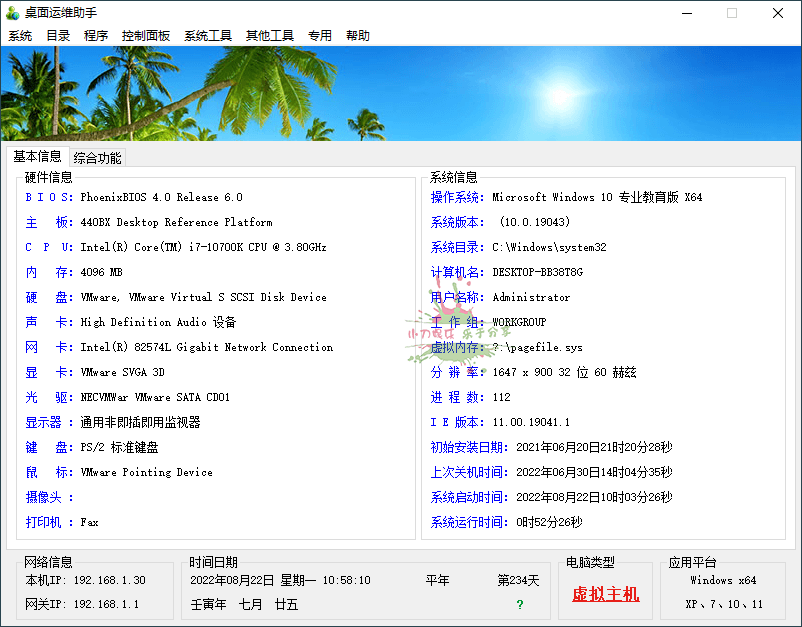
Windows桌面运维助手单文件 软件介绍 桌面运维助手是一款集合了Windows 优化、设置、管理的工具等功能与一身的实用工具。它的功能栏目相当的丰富,帮助自己快速完成一些快捷操作,提升工作效率,每个分类下都有大量的实用工具与快捷功能,能够更加方面用户们对系统的运维管理使用。 软件Windows桌面运维助手单文件 图片2Windows桌面运维助手单文件 图片4Windows桌面运维助手单文件 图片6 软件功能 1、单文件,部分集成软件随系统(32位、64位)运行 2、菜单栏:大部分常用Windows工具,专用中有些其他功能 3、基本信息:硬件与系统的基本信息,底栏也会有一些网络时间信息 4、综合功能:集成30款第三方实用工具,应有尽有(硬件、系统、辅助等) ⬇️ 下载地址 {cloud type="tianyi" title="天翼云盘" url="https://cloud.189.cn/t/VZvI7rEFNbmq"} 下载后请先检查文件完整性,如有问题请在评论区反馈